
New article 43
The Australian Business Number is a unique identifier for Australian businesses. This is not provided with Spirion Sensitive Data Platform out-of-the-box. This must be created as a custom sensitive data definition (SDD).
- ABNs can be created as a custom Agent. See What is an Agent?
- Also see ABN
Agent
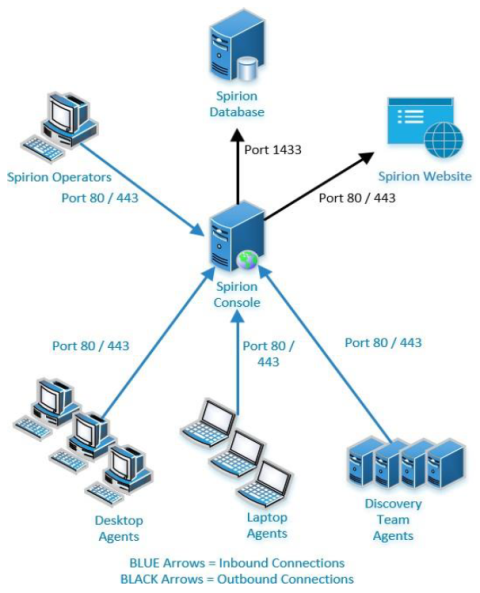
An Agent is an application, installed locally or on a remote VM, which scans and evaluates locations (cloud or local) for sensitive data such as social security numbers, credit card numbers, etc. Agents operate on behalf of the Spirion Console and send the data they collect back to the Spirion console to be viewed, analyzed, and acted upon by Spirion users.
- For speed and efficiency, Agents are typically deployed in a collection, called a Discovery Team. See Discovery Team, below.
- See also What is an Agent?
Agent GUI
See Spirion Agent, below.
Agent Policy
An Agent Policy is a set of rules for the agent to follow. Agent Policies are defined on the Agents > Policies page.
Asset
An Asset or Data Asset is a location, local, or remote (such as cloud-based), that contains Targets (a Target is any data location inside an Asset that Sensitive Data Platform can scan).
- For example, an SQL server (Asset) with multiple SQL Databases hosted on it (Targets)
A location can be both an Asset and a Target.
- For example, a workstation (Asset and single Target)
Classification
The action of applying a label to a location via the file system, directly within the file metadata, or within the Spirion Sensitive Data Platform database.
Common Files
For both macOS and Windows, see Select Files by Extension.
Compensating Controls
Compensating Controls are actions applied to sensitive data discovered in your environment.
- These actions include: restricted access, script execution, quarantine, ignore, and Playbook user actions.
In the SPIglass™ Dashboard, Compensating Controls represents the total cost of all sensitive data matches with compensating controls in place. All costs are taken from the dollar value assigned to each data type in the global data types settings.
In the Organizational Data Risk semi-circle chart, Compensating Controls are shown against Inherent and Residual data. For more information, see SPIglass™ Dashboard.
Custom Data Types
Defined data structures that represent custom (user-defined) types of sensitive data, such as IMEI numbers or ABNs (Australian Business Numbers). See Add a Custom Data Type.
CUI
Controlled Unclassified Information. See CUI.
Data Loss Prevention (DLP)
The DLP software solutions detect and prevent data breaches, exfiltration, and unwanted destruction of sensitive data. Spirion Sensitive Data Platform's ability to scan, detect, and classify at-risk sensitive data in your environment means it aligns perfectly with the next phases of data loss prevention, included below.
DLP technologies perform the following basic automated functions:
Classifies data
Monitors and controls
- Monitors the flow of data as it is accessed and shared by end users to identify any policy violations in a wide variety of locations, filters data streams on corporate networks, and monitors data in the cloud to protect data-at-rest, in-motion, and in-use, and to provide visibility into data and system access of:-Emails and texts
-Servers
-Endpoints
-Cloud stasdorage
-Shared applications
-Mobile devices
-Websites
-Social media
-Printers
Identifies violations of policies
- Defined by organizations or within a predefined policy pack, systems identify data leaks that are anomalous or suspicious.
Enforces remediation
- Takes pre-defined actions to prevent end users from accidentally or maliciously sharing data, such as:Alerting users and admins
-Quarantining suspicious files
-Encrypting data
-Blocking traffic outright
-Filtering data streams to restrict suspicious or unidentified activity
Creates reports
- Provides logging and reports for compliance, auditing, forensics, and incident response purposes that identify areas of weakness and anomalies.
Types of DLP Software
There are three main types of DLP solutions from which organizations can choose based on their needs:
- Network DLP
- Endpoint DLP
- Storage DLP
Popular DLP Tools
There are many DLP solutions available in the marketplace. These are some of the most popular options:
Symantec DLP
This scalable software suite gives organizations the ability to see how and where information is kept across their enterprise. It monitors mobile, cloud, and endpoints, and is especially effective when employees are offline.
McAfee DLP
This software solution monitors data on premises, in the cloud, or at endpoints, where it protects intellectual property and supports compliance by protecting all sensitive information.
Check Point DLP
This technology educates businesses and individuals so that they can act efficiently and quickly to prevent data loss. It includes a central management console, and easy implementation using preconfigured rules.
Digital Guardian DLP
This software, available as a cloud-based or on-premise system, is compatible with Mac, Windows, and Linux endpoints, and can manage a large number of workstations.
More information: For more on Data Loss Prevention, see the Data Loss Prevention guide.
Data Types
Defined data structures that represent different types of sensitive data, such as a credit card number, password, or social security number. See Global Data Types.
Delimiters
When using scan playbooks, including adding a new scan playbook, you add or edit data types. During this process you are prompted with the option to specify additional valid delimiters when searching. In this box enter any additional valid delimiters Sensitive Data Platform may encounter when scanning for the specified data type in your environment. A delimiter is a character or sequence of characters that marks the boundary between different parts of data, like a comma in CSV files, a tab, or a space. Delimiters help separate individual items or fields in text or data streams, enabling applications such as Sensitive Data Platform to parse and understand the data's structure.
Dictionary
An end-user provided list of terms Sensitive Data Engine (SDE) can use to look for.
Discovery (Metadata Scan)
The action of scanning a file system to find files and folders OR databases / blob stores to identify data locations.
Discovery Team (Dynamic Agent Team)
Discovery Teams are a collection Spirion Agents, installed on physical and/or virtual machines (local or remote), which are used to scan servers, cloud sources (SharePoint, box, Google Workspaces, etc.) for sensitive data. See What is an Agent?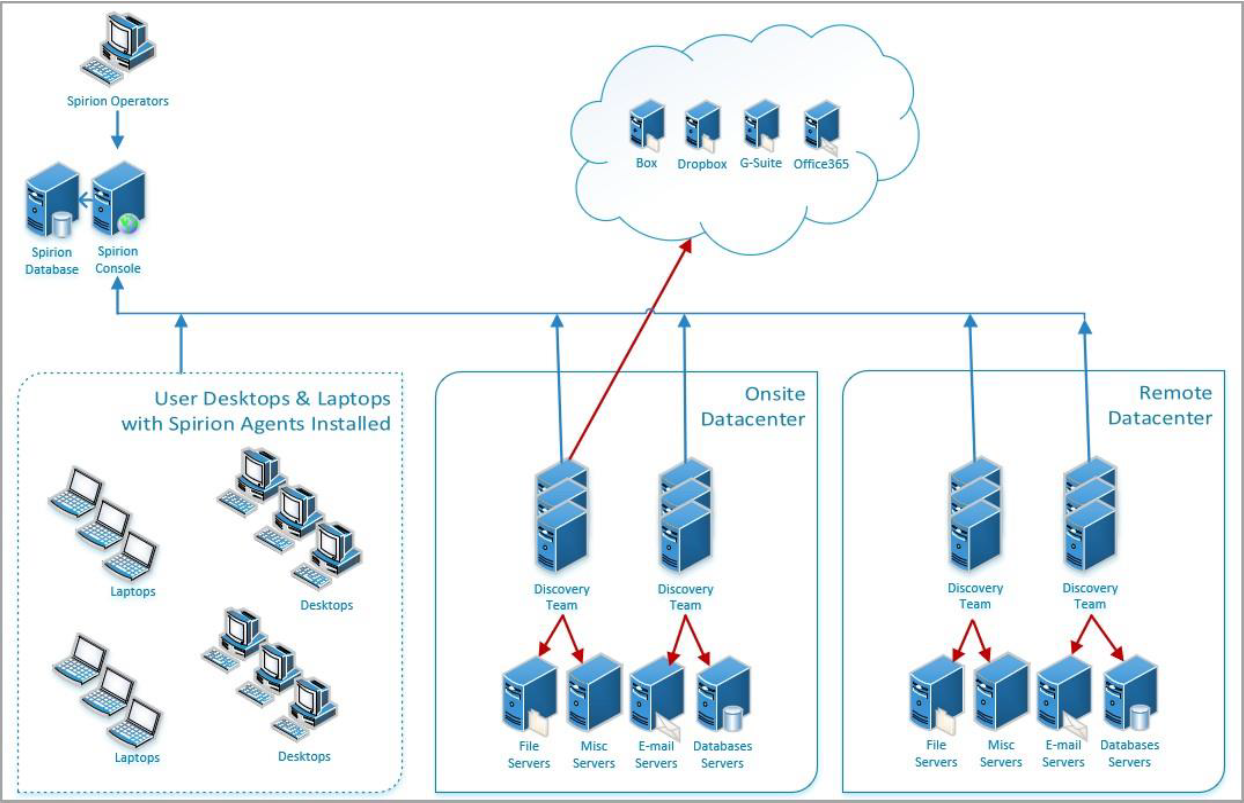
Distributed Scanning
A group of agents configured to scan targets and collectively work to complete that scan.
Dynamic Agent Team (Discovery Team)
See Discovery Team, above.
Endpoint
Previous term used for Target.
An Agent can also act as an endpoint.
Gather Data
The Gather Data function gathers the following information from the machine the agent is running on:
- Logs and system information:
- EPS log files
- Error reports
- FCI log files
- IFS log files
- System search log files
- Processes actively running
- Permissions
- Registry values
For more information, see Gather Agent Data
Global Ignore List
A simple data type that is an exact case-sensitive match.
Global Ignore List: Pattern-Based
For users of Sensitive Data Platform who want to exclude specific results from one or more searches, the Pattern-Based Global Ignore List was introduced in version 13.6. This feature broadly excludes exact matches or regex patterns. This feature is accessible via the UI and does not require a separate SDD or Search API
GUID
When Spirion Sensitive Data Platform Classifications (Secret, Top Secret, Reg, Proc, etc.) are applied, via scan playbooks, to files which contain sensitive data, a label which provides a GUID is applied to the file. Data Loss Prevention (DLP) software uses GUIDs to take appropriate actions to safeguard sensitive data.
IBAN
International Bank Account Number (IBAN) is a standardized, alphanumeric code of up to 34 characters identifying a specific bank account, primarily used for cross-border transactions in Europe, the Middle East, and the Caribbean to ensure accuracy. It comprises a country code, check digits, and bank/branch details, speeding up international payments.
Key Aspects of IBANs:
- Purpose: Standardizes account identification to facilitate faster, more secure international payments and reduce errors.
- Structure: Includes a 2-character country code, 2-digit check digits, and a country-specific bank/branch identifier.
- Usage:
Required for transactions in over 80+ countries, particularly within the SEPA (Single Euro Payments Area) region. - Where to Find: Located on bank statements, via online banking, or in mobile apps.
- Validation: Uses MOD 97 (ISO 7064) to verify accuracy, preventing payments from being returned.
- Complementary Code: Often paired with a BIC (Bank Identifier Code) for swift processing.
It is not commonly used in the United States, which operates on a different routing system.
Keyword
A simple data type that is an exact case-sensitive match.
Last Heartbeat
The amount of time elapsed since the agent sent a signal indicating it was active/ready.
Locally Logged On User
An end-user who is directly logged into a given computer (that is, "At the keyboard" and not through Remote Desktop/RDP).
Location
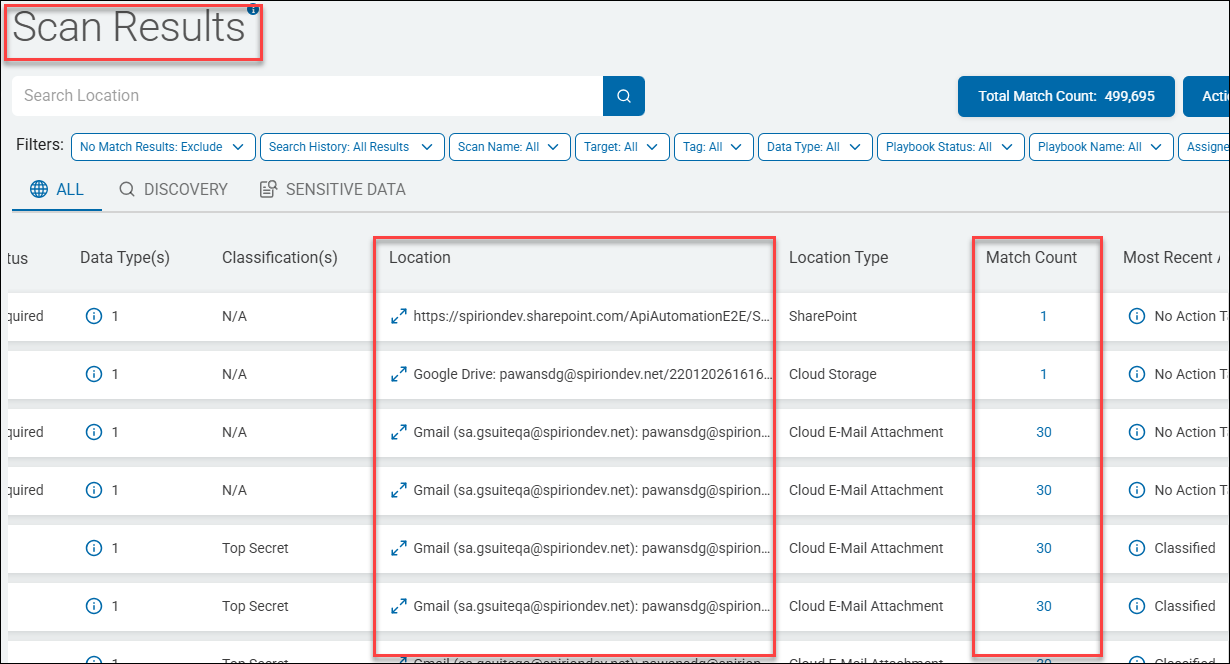
A Location is a file (or email) which contains at least one sensitive data match (such as a single social security number). Locations are discovered, collected, and analyzed by Spirion sensitive data scans.
- The Location name includes the full path to the file or email, such as "c:\temp\chat.docx".
- A Location contains one or more sensitive data matches (also simply referred to as "matches").
- Many tables in various parts of the Spirion Sensitive Data Platform application, such as the Scan Results page, below, contain details about scanned Locations.
- Examine each Location to learn about the sensitive data matches it contains
- You can apply specific actions (such as Redact) to one or both Location files (c:\Passwords\Pwd.txt) and sensitive data Matches ("MyEmailPassword123" within the file Pwd.txt). For more information see How to Perform Location and Match Actions on Scan Results
Managed Data
Managed data in Spirion Sensitive Data Platform is sensitive data (such as a Social Security Number or Credit Card number) that has been acted upon in the following ways to lessen or eliminate the risk to your organization:
- Quarantined
- Redacted
- Shredded
- IgnoreLocation
- Classified
- Script (executed against the data)
- Permissions (Access restricted)
Additionally, data that has received the following actions is considered Managed data:
- Ignored
- GloballyIgnored
- UserAction taken on data
- MipLabel applied to data
Also see What is Managed Data?
Match
A Match is also referred to as a "sensitive data match."
A Match is an instance of sensitive data, such as a single Credit Card number or Social Security number, searched for by a Sensitive Data scan and discovered in files or emails within your environment. Sensitive Data Matches are located within files or emails which are referred to as "Locations" (see "Location" above).
Each individual sensitive data match is treated as unique by Spirion Sensitive Data Platform.
The Scans dashboard and SPIglass dashboard contain charts and graphs which measure the amount of sensitive data matches in your environment, categorized and displayed in a number of different ways.
Actions such as classification, quarantine, ignore, redact, etc. are applied to sensitive data matches to reduce or eliminate the risk they pose to your oganization.
Password
Spirion’s password syntax rules are as follows:
The password must be at least 10 characters long, and a minimum of:
- 1 alpha character
- 1 uppercase
- 1 lowercase
- 1 number
- 1 special character
Use only passwords which conform to these rules.
PCI
Payment Cardholder data, which includes information like credit card numbers, expiration dates, and cardholder names, protected by the Payment Card Industry Data Security Standard (PCI DSS).
- This standard is a set of security rules created by major credit card brands to ensure that any entity processing, transmitting, or storing this sensitive data maintains a secure environment.
- Businesses must be PCI compliant to protect this data, prevent fraud, and avoid penalties from payment processors and card networks.
Personally Identifiable Information (PII)
Personally Identifiable Information (PII) is any data that can distinguish, trace, or locate an individual's identity, such as names, Social Security numbers, biometric records, credit card number, date of birth, address, etc..
PII includes sensitive data (for example, medical, financial) and non-sensitive data (phone numbers, IP addresses).
- PII is protected via regulations such as the Privacy Act of 1974, requiring secure, limited, and authorized processing
- Examples include: Name, address, social security number, telephone number, email address, gender, race, birth date, medical, educational, financial and employment information
- The most commonly stolen and misused personally identifiable information (PII) includes Social Security numbers (SSNs), credit/debit card numbers, and full names combined with bank account details.
- These are frequently targeted in data breaches to commit financial fraud, open new credit lines, or file fraudulent tax returns.
Mismanaged PII can lead to:
- Identity Theft: Attackers use PII to open accounts or commit fraud.
- For example, if it is intercepted, an IMEI number can be used for malicious purposes, including cloning the device or fraudulent network activity
- Data Breaches: Unauthorized access to large datasets can be costly in addition to severely damaging an organization's reputation.
Most Valuable PII
The most valuable personally identifiable information (PII) is personal medical information, which can be worth more than ten times the value of credit card data on the black market. This, along with Social Security numbers (SSNs), is considered high-risk, as it enables long-term identity theft and financial fraud.
Top High-Value PII Targets
The following PII is considered the highest value:
- Medical Records (PHI): Highly prized because they are difficult to change, often go unnoticed when stolen, and include comprehensive data (names, birth dates, diagnoses, and insurance details).
- Social Security Number (SSN): Considered the "keys to the kingdom" for financial theft, employment fraud, and opening new accounts.
- Biometric Records: Fingerprints, DNA, and facial recognition data are invaluable because, unlike a password, they cannot be changed once compromised.
- Financial Information: Bank account and credit card numbers provide immediate access to funds.
Why This Data is Most Valuable
Criminals prioritize this data because it allows for "full-house" identity theft, where they can impersonate a victim for years, rather than just conducting a single fraudulent transaction.
- Furthermore, just three pieces of information - gender, ZIP code, and date of birth - can uniquely identify 87% of the U.S. population.
Playbook (Scan Playbook)
A sequential set of rules which define the action(s) to be taken on the SPI or PII discovered when performing a sensitive data scan.
- For example, when a scan discovers sensitive data matches, the scan playbook instructs Spirion Sensitive Data Platform to take the action of referring those specific matches to a specific department for review and remediation.
Playbook Builder
The administrative view for creating and defining a playbook.
Playbook Executor
The end user view for investigation and remediation of matches.
Policy
Settings that determine how a Spirion Agent operates at its base state.
PostgreSQL
PostgreSQL, or Postgres, is a powerful, free, and open-source object-relational database management system (RDBMS) known for its reliability, feature robustness, and extensibility. It uses the SQL language for querying and transactions. PostgreSQL supports a wide range of data types, complex queries, and transactional integrity (ACID-compliant), making it a popular choice for enterprise-level applications, web services, and data analytics.
- Spirion Agents version 13.6 and later use PostgreSQL
- Spirion Agents parse all known files and generate a list of locations with sensitive data which is put into the PostgreSQL database.
- Additional Spirion agents consume the list provided by the PostgreSQL queue and send their results back to PostgreSQL.
- Those results are bashed and sent back to the Spirion console.
Protected Matches
Protected matches are sensitive data matches that have received one or more of the following scan playbook actions:
- Quarantine
- Redact
- Shred
- Permissions/Restrict Access
*Sensitive data matches labeled "MIP" and/or "Classified" do not qualify as Protected matches.
Quarantine
Isolating vulnerable or sensitive data by moving the data to a secure location. For example, sensitive data, such as credit card numbers, are discovered on a user's laptop and moved to a secure OneDrive folder. See How to Quarantine to OneDrive.
RabbitMQ (RMQ)
- RabbitMQ is used by Spirion Agents v13-13.5. Spirion Agents v13.6 and later use PostgreSQL.
Note: Sensitive Data Manager (SDM), Spirion Mac Agents, and Spirion Linux Agents do not use RabbitMQ.
Spirion agents parse all known files and generate a list of locations with sensitive data which are placed into a queue managed by RabbitMQ. Additional Spirion agents consume the list built up in the queue. Agents perform scans with queue information and send their results back to RabbitMQ. Those results are bashed and sent to the Spirion console. Note: RabbitMQ requires the Erlang programming language.
Redaction
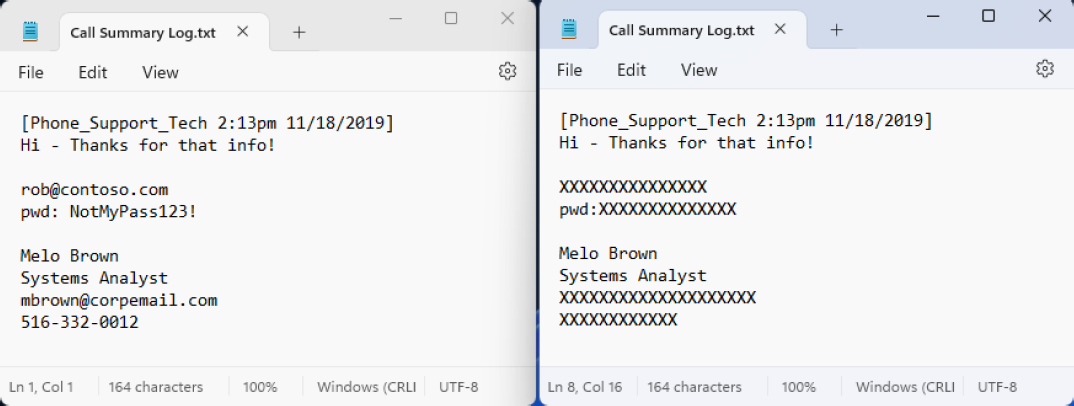
Data redaction permanently removes or obscures sensitive information within documents or records, which prevents unauthorized individuals from viewing or recovering it.
For example, sensitive data, such as passwords or social security numbers are discovered in a text file and are replaced with characters such as 'X' or '#'.
RegEx - Regular Expression
A common method of finding patterns within blocks of text. RegEx is used in Spirion Sensitive Data Platform to create custom search criteria for locating specific patterns in data. This includes identifying sensitive information such as personal data, financial details, and other confidential information by defining patterns that match various formats of data.
- RegEx enables precise and flexible searching, which is essential for data discovery and compliance with privacy regulations.
- Regular expressions can be run directly from the Spirion Client interface or via a Console policy.
- Additionally, you can test regular expressions using online RegEx testers like regex101.com, ensuring that they align with the Spirion implementation.
Remediation
Remediation is a proactive approach to addressing vulnerabilities and ensuring data is accurate, complete, and consistent, thereby mitigating risks and adhering to regulations.
- Quarantine, redaction, and deletion of vulnerable data are all examples of remediation actions.
Scans
Scans are the searches that agents perform on endpoints (targets) to find either the file locations (Discovery Scan) or find specific data types (Sensitive Data Scan) within the files and folders.
Scan - Discovery
The action of scanning a file system to find files and folders OR databases / blob stores to identify data locations.
Scan - Sensitive Data Scan
See Sensitive Data Scan below.
Scan Configuration
Settings that determine what is scanned, where scans occur, which agents perform the scan, and what configuration options are used during that scan.
For Sensitive Data Scans this includes a Playbook.
Search
The action of scanning within a file, folder, database, or blob stores for specific data type matches.
Security Measures Vulnerability Scores
The score (numerical value) given to a security measure, such as an anti-virus application, to measure how much it reduces the vulnerability of an asset. Encryption, multi-factor authentication, password rotation and other similar security measures contain vulnerability scores. See Data Asset Inventory Settings.
Sensitive Data Match
See Match, above.
Sensitive Data Scan
This type of scan enables you to search for sensitive data, such as a credit card number, password, or social security number, within defined Targets and take actions on them based on the playbook rules defined for them.
Sensitive Data Definition (SDD)
Search engine logic created by end-users to find custom data types. These custom data types NOT provided out-of-the-box. Located under Settings > Global Data Types > CUSTOM DATA TYPES tab.
- Examples include IMEI numbers and ABN (Australian Business Numbers).
Sensitive Data Engine (SDE)
Search engine used for classification comprised of various modules (for example, RegEx, Dictionary, Keyword, and so on).
Sensitive Personal Information (SPI)
Sensitive Personal Information (SPI) is data that if exposed, could lead to significant harm like identity theft, fraud, or discrimination.
The following are examples of SPI:
- Government IDs: Social Security Number, driver's license, passport number, state ID
- Financial Data: Account numbers, login credentials, credit/debit card numbers with security codes
- Biometric & Health Data: Fingerprints, genetic data, health records, mental/physical health details
- Demographic/Beliefs: Racial/ethnic origin, religious beliefs, union membership, sexual orientation
- Location: Precise geolocation
- Communications: Contents of mail, email, or text messages (unless you're the intended recipient)
- Child's Data: Personal data from known children (under 13 in some states)
SPI is a subset of Personally Identifiable Information (PII) that carries a higher risk. Its compromise can lead to severe consequences, making it a critical focus in data privacy laws (like CPRA, GDPR) that often require explicit consent for processing, unlike standard PII.
Social Insurance Number (SIN)
Spirion AnyFinds data type.
A Social Insurance Number (SIN) is Canada's unique 9-digit identifier used for working, accessing government programs, and filing income tax returns.
It is confidential and must be protected to prevent fraud.
You are required to provide your SIN to your employer and other financial institutions for income-related matters.
Also see:
Spirion Agent GUI
Also called the "Spirion app," or "Spirion Client."
The Spirion Agent GUI is the name used for the Spirion application installed separately from Spirion Sensitive Data Platform.
- The Spirion Agent GUI is installed on an endpoint such as a local laptop or workstation.
- Windows and Mac operating systems are supported. Linux OS is not supported.
- From the Windows Start menu enter the word "Spirion" to locate and launch the application.
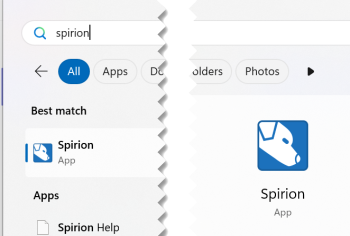
The Spirion Agent GUI provides a user-friendly interface for testing, configuring scans, viewing scan results, and managing sensitive data policies. For example, the Spirion Agent GUI can be used to test the connection string to a database such as PostgreSQL or MSSQL.
- See How to Configure and Test a Database for Searching.
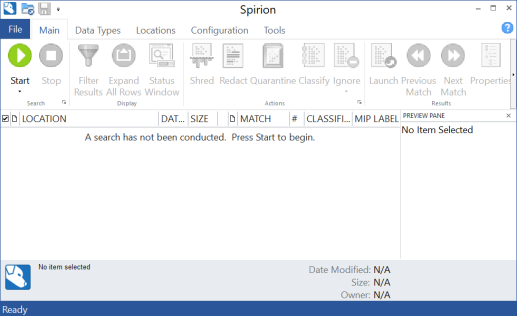
- Note: The Spirion Agent GUI is required to configure database scanning.
- The Spirion Agent GUI offers faster responses and a better view of how scans are actually progressing.
- The Spirion Agent GUI does not enable you to do the following:
- Leverage playbooks in Spirion Sensitive Data Platform.
- Configure certain Targets (Amazon S3, Exchange Online, others)
Spirion-Defined Policy
Settings that are required but not configurable by the user.
Spirion-Defined Defaults
The default settings used by Spirion Sensitive Data Platform unless or until changed by a user.
Tags
A Tag is a kind of container.
- A Tag is a manual or dynamic group of Targets, such as: Marketing Laptops or HR Databases, or MAC Agents, or Linux Agents, or SQL databases, etc.
- Recall, an Agent (Windows, or Mac, Linux, or Legacy (pre-version 13.0)) can act as a Target
Three are three types of Tags:
- IP Range
- Manual
- Conditional
You can select the Targets for your Tag manually, or you can define the conditions that determine which Targets are placed into your Tag.
- See Tag Management
Target
A Target is any data location within an Asset that Spirion Sensitive Data Platform can scan.
Targets can be in a “physical” box that can be scanned or they can be in a cloud asset.
- Examples:
- Targets in Local Assets: SQL Databases on a local SQL server
- Targets in Cloud Assets:
- Databases on Amazon S3, Azure Blob, Bitbucket, Google Drive
- File Directories in SharePoint
- Targets in Email:
- Exchange On-Prem email which is housed on a local server
- Exchange Online email which is housed in the cloud
- Targets in Virtual Machines:
- Databases on an Oracle VM, Amazon EC2, etc.
- Agents can act as Targets
User-Level Remediation (ULR)
User-Level remediation is when an end user uses Spirion Sensitive Data Platform to take actions to lessen or eliminate the risk of sensitive data which is typically stored on their own workstation or laptop.
ULR:
- Empowers the end user to address sensitive data policy violations, issues or risks and resolve them. See
- For example, a physical machine such as a users's laptop or workstation contains passwords and exposed financial information such as bank records.
- The user can take action on the sensitive data discovered on their machine from the Location details window available from the "Scan Results" page. See How to Perform Location and Match Actions on Scan Results.
Unmanaged data
Unmanaged data in Spirion Sensitive Data Platform is sensitive data that has been not acted upon (No action) or else has been acted upon in the following ways:
- Assigned (to a specific user to take appropriate action including No action)
- Notified (a notification is emailed to a specific user to alert them)
Unprotected Matches
Unprotected matches are sensitive data matches that have received one or more of the following scan playbook actions:
- No Action Taken
- MIP
- Classified
*Sensitive data matches labeled "MIP" and/or "Classified" do not qualify as Protected matches.
Work Item
Job for the agent to do (for example, Discovery, Classification, Remediation).
Workflow Rule
The logic and actions to be performed automatically when matches are validated.